RAG Pipeline Guide
Retrieval Augmented Grounding (RAG) lets the Docker AI Agent search through real Docker documentation before answering your questions. Instead of relying only on what the LLM was trained on, the agent retrieves relevant chunks from the official Docker docs and uses them as context.
This guide explains how the pipeline works, how to configure it, and how to initialize it.
Architecture
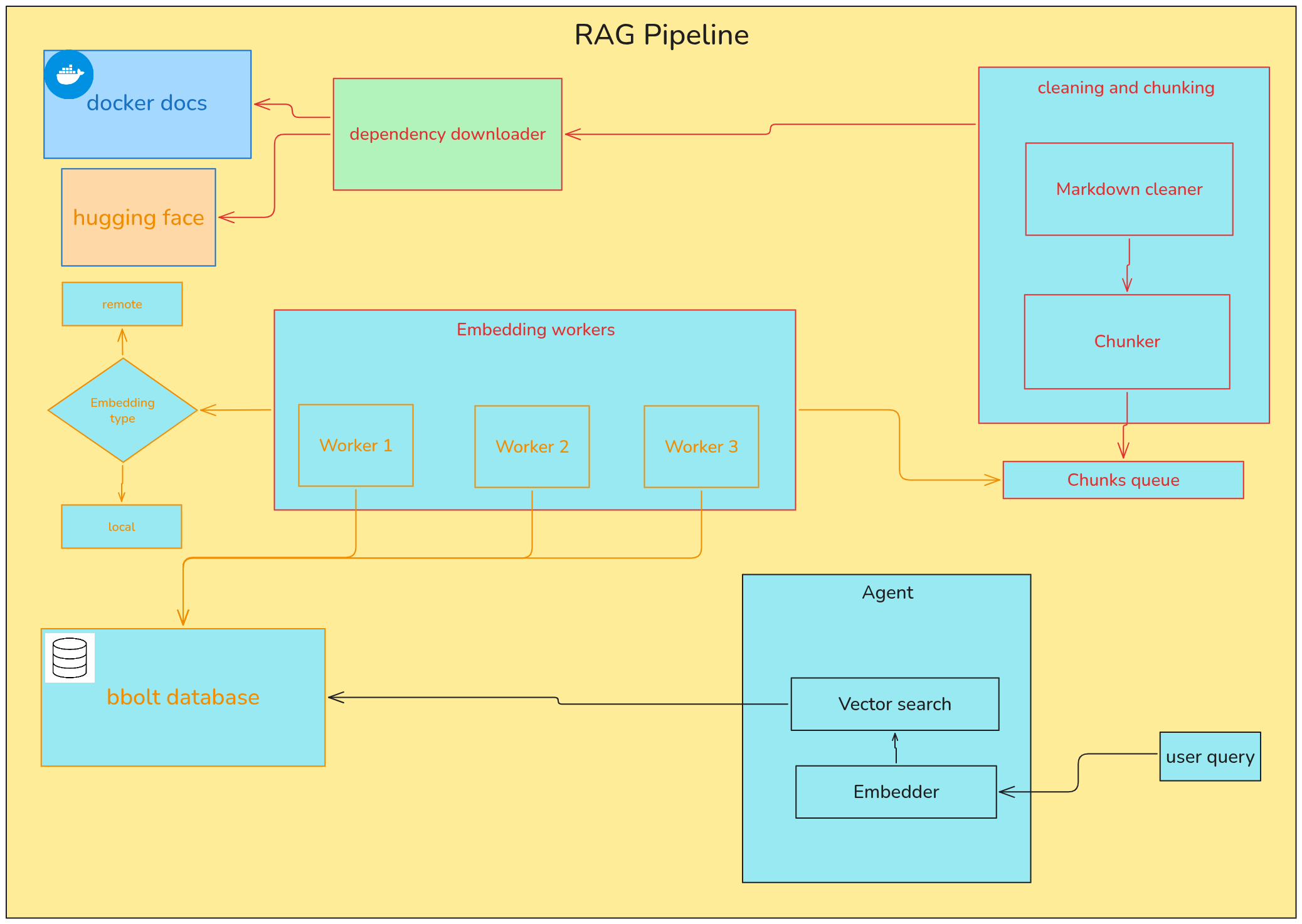
The pipeline has two main phases:
- Indexing phase (run once via
initalizeRag): Downloads Docker docs, cleans them, chunks them into pieces, embeds each chunk into a vector, and stores everything in a local database. - Query phase (happens automatically during agent chat): Loads the stored vectors into an in-memory index, embeds the user’s question, and searches for the most similar document chunks.
How It Works
Step 1: Download Docker Documentation
The pipeline downloads the entire Docker docs repository from GitHub as a zip file. It extracts only the markdown files from the content/ directory and saves them under $HOME/.docker_agent/content/.
If the docs already exist on disk, this step is skipped.
Step 2: Clean the Markdown Files
Each markdown file is cleaned to remove:
- Hugo shortcodes (anything inside
{{ }}blocks) - Empty lines
This reduces noise before chunking.
Step 3: Chunk the Documents
The cleaned markdown files are split into smaller pieces (chunks) using a markdown-aware text splitter. The splitter:
- Preserves heading hierarchy so chunks keep their section context
- Keeps code blocks intact
- Maintains separators between sections
Each chunk is tagged with metadata from the file’s front matter (title, description, keywords) and the source file path.
Chunks are sent into a buffered channel as they are produced.
Step 4: Embed the Chunks
Worker goroutines pull chunks from a queue channel and embed them into vectors. You can choose between two embedding modes:
Local Embedding (recommended)
- Uses the
bge-small-en-v1.5model from HuggingFace - Runs via ONNX Runtime using the
hugotGo package - CPU mode works out of the box with no extra setup, but is slow (can take over 3 hours for the full docs)
- GPU mode is much faster (around 4 minutes) but requires CUDA and ONNX Runtime
Remote Embedding
- Uses Google embedding models through the Genkit library
- Requires an API key set via
embedding-api-keyin config or theEMBEDDING_API_KEYenvironment variable - Faster and simpler to set up, but requires a paid API key
Step 5: Store in BBolt Database
Embedded vectors are written to a BBolt (embedded key-value) database using batch writes. This means multiple inserts are grouped into single transactions under the hood, making it safe for concurrent workers.
The database file is stored at $HOME/.docker_agent/dockerChunksDb.db.
Step 6: Query Time Retrieval
When the agent starts a chat session, the retriever:
- Opens the BBolt database
- Reads all embedded documents into an in-memory vector index (powered by
chromem-go) - Embeds the user’s question using the same embedding model
- Performs a similarity search to find the top 10 most relevant chunks
- Returns those chunks as context to the LLM
Note: The in-memory index is rebuilt from disk every time the agent starts. This means startup can be slow depending on how many documents are stored.
Configuration
RAG is configured through the rag section in your config.json file. Here is a full example with all available options:
{
  "provider": "Gemini",
  "model-name": "googleai/gemini-2.5-flash-lite",
  "max-iterations": 10,
  "rag": {
    "embedding-type": "local",
    "inference-type": "gpu",
    "chunk-size": 256,
    "overlap-size": 50,
    "workers-number": 4
  }
}
Configuration Fields
| Field | Type | Required | Description |
|---|---|---|---|
embedding-type | string | Yes | Either "local" or "remote". Local uses the bge-small-en-v1.5 model. Remote uses Google models via Genkit. |
inference-type | string | Only for local | Either "cpu" or "gpu". GPU requires CUDA and ONNX Runtime. Ignored for remote embeddings. |
chunk-size | int | Yes | Maximum size of each text chunk in characters. Must be greater than 0. |
overlap-size | int | Yes | Number of characters that overlap between consecutive chunks. Must be less than chunk-size. |
workers-number | int | Yes | Number of concurrent embedding workers. Higher values use more CPU/GPU resources. |
model-name | string | No | Name of the embedding model. Only used for remote embeddings. Defaults to Google models. |
embedding-api-key | string | Only for remote | API key for the embedding provider. If not set, the pipeline looks for the EMBEDDING_API_KEY environment variable. |
Example: Local Embedding with CPU
{
  "rag": {
    "embedding-type": "local",
    "inference-type": "cpu",
    "chunk-size": 256,
    "overlap-size": 50,
    "workers-number": 2
  }
}
Example: Local Embedding with GPU
{
  "rag": {
    "embedding-type": "local",
    "inference-type": "gpu",
    "chunk-size": 256,
    "overlap-size": 50,
    "workers-number": 4
  }
}
Example: Remote Embedding
{
  "rag": {
    "embedding-type": "remote",
    "chunk-size": 256,
    "overlap-size": 50,
    "workers-number": 4,
    "embedding-api-key": "your_api_key_here"
  }
}
You can also set the API key via environment variable instead of putting it in the config file:
export EMBEDDING_API_KEY=your_api_key_here
Initializing the RAG Pipeline
Before you can use RAG, you need to run the initialization command. This downloads the Docker docs, downloads the embedding model (if using local), cleans and chunks the documents, embeds them, and stores everything in the database.
Basic Command
go run . initalizeRag
Or use the shorter alias:
go run . ir
With a Custom Config File
go run . initalizeRag -c ./my-config.json
Or with the alias:
go run . ir -c ./my-config.json
What Happens During Initialization
- The pipeline creates the dependency directory at
$HOME/.docker_agent/if it does not exist. - It downloads the Docker docs zip from GitHub, extracts the markdown files, and saves them under
$HOME/.docker_agent/content/. - If using local embedding, it downloads the
bge-small-en-v1.5model files from HuggingFace to$HOME/.docker_agent/local_model/. - Each markdown file is cleaned (Hugo shortcodes and empty lines removed).
- Cleaned files are chunked and sent to a channel.
- Embedding workers pull chunks from the queue and embed them.
- Embedded vectors are stored in the BBolt database at
$HOME/.docker_agent/dockerChunksDb.db.
A progress bar is displayed during embedding so you can track the process.
Resuming Initialization
The initialization process can be stopped and resumed. If you stop it midway:
- The Docker docs are already downloaded and will not be re-downloaded.
- The embedding model is already downloaded and will not be re-downloaded.
- Chunks that were already embedded and stored in the database are skipped when you run the command again.
This means you can safely re-run initalizeRag without starting from scratch.
Dependencies and Storage
All RAG dependencies are stored under $HOME/.docker_agent/. The directory structure looks like this:
$HOME/.docker_agent/
  content/           # Extracted Docker docs (markdown files)
  local_model/       # Downloaded bge-small-en-v1.5 model files
    config.json
    tokenizer.json
    tokenizer_config.json
    special_tokens_map.json
    vocab.txt
    model.safetensors
    onnx/
      model.onnx
  dockerChunksDb.db  # BBolt database with embedded vectors
Disk Space
- The Docker docs are roughly 50-100 MB when extracted.
- The bge-small-en-v1.5 model files are approximately 250 MB total.
- The database size depends on the number of chunks and their embedding dimensions.
GPU Setup
If you want to use GPU acceleration for local embedding, you need two things:
1. CUDA Runtime
Install the CUDA runtime packages. The exact version depends on your NVIDIA GPU. For example:
sudo apt install cuda-cudart-13-3 libcublas-13-3 libcurand-13-3 libcufft-13-3 libcudnn9-cuda-13
Check your GPU and driver version to determine the right CUDA packages for your system.
2. ONNX Runtime
The ONNX Runtime library must be installed and compatible with your CUDA version. Visit the official repository for installation instructions:
https://github.com/microsoft/onnxruntime
The local embedder looks for the ONNX shared library at /usr/local/lib/ by default.
Important Notes
-
Chunk size and model tokens: The chunk size must not exceed the maximum number of tokens the embedding model accepts. For example,
bge-small-en-v1.5expects a maximum of 512 tokens. If your chunk size is too large, the embedding will fail partway through. A chunk size of 256 is a safe starting point. -
Overlap size: The overlap size must always be smaller than the chunk size. A good default is around 10-20% of the chunk size.
-
Workers number: Set this based on your system resources. Too many workers can exhaust CPU/GPU memory. For CPU, start with 2 workers. For GPU, 4 workers is reasonable.
-
Startup time: On every agent start, the entire vector index is rebuilt from the BBolt database into memory. This adds startup time proportional to the number of embedded documents.
-
Remote embedding provider: Currently only Google models are supported for remote embedding through Genkit. Support for other providers may be added later.
-
Pre-built database: A pre-built database file with pre-embedded data may be shipped in the future for users who cannot afford the time to embed with CPU and do not have a GPU.
Troubleshooting
Embedding stops in the middle: Your chunk size is likely too large for the model. Reduce chunk-size to 256 or lower.
CUDA errors: Make sure your CUDA version is compatible with the ONNX Runtime version you installed. Check that the ONNX shared library is present at /usr/local/lib/.
API key not found for remote embedding: Set the EMBEDDING_API_KEY environment variable or add embedding-api-key to the rag section in your config file.
Database locked error: Make sure no other instance of the agent is running. BBolt only allows one process to open the database at a time.
Slow CPU embedding: This is expected. The full Docker docs corpus can take over 3 hours to embed on CPU. Consider using GPU mode or remote embedding if you need faster results.