Architecture
This page describes how the project is put together: the major components, how data flows through them, and what each package is responsible for. It is written for contributors who want to modify the agent or add new capabilities.
Component map
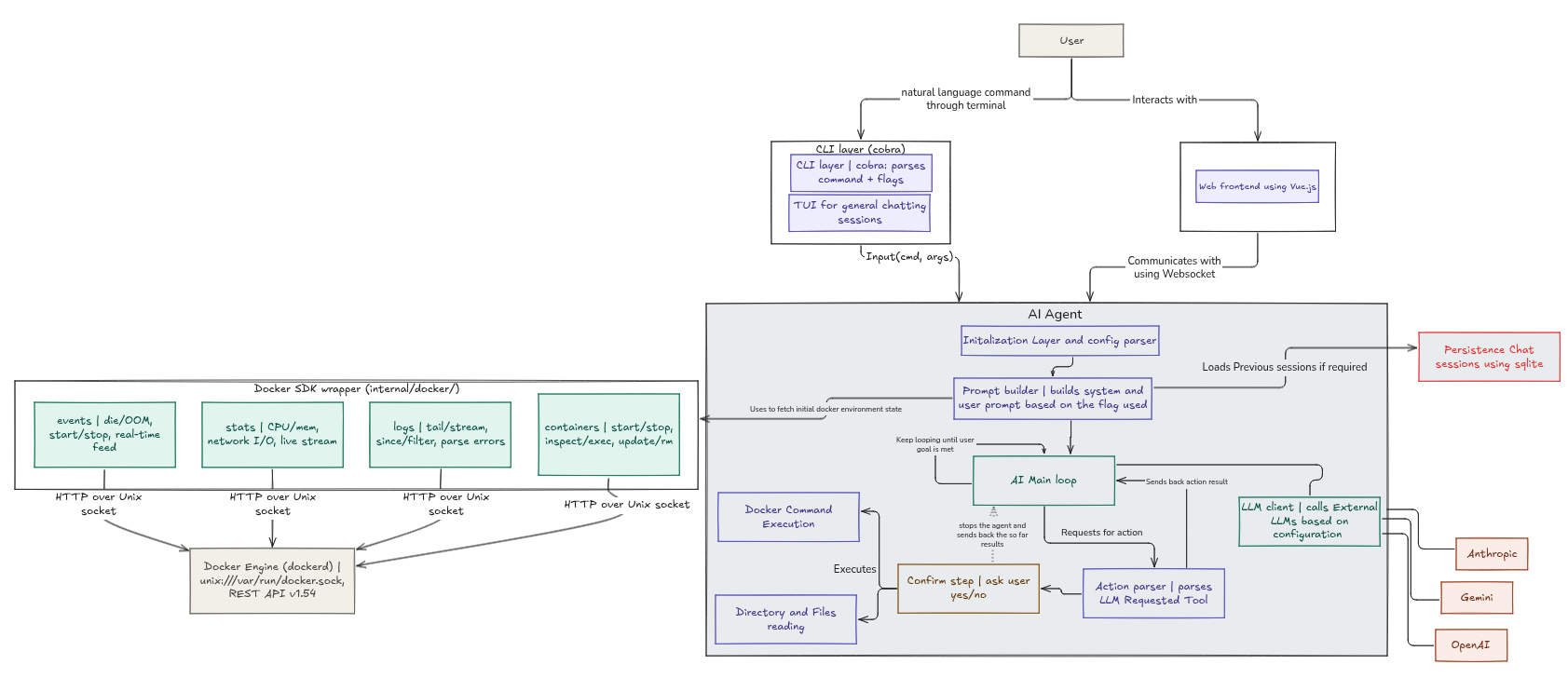
Data flow for a user message
- The user submits a message from the TUI, and the agent runner (
tui/agent_runner.go) spawns the agent loop in a goroutine, passing the user message over theAgentCommunicationchannels defined ininternal/core/agent_communication.go. The runner guarantees that at most one loop is alive at any time. - Earlier, at startup, the agent captured a Docker context snapshot through the SDK. The snapshot is formatted into text and embedded in the system prompt.
- The intent classifier labels the message as a question, an action request, or ambiguous.
- Action requests run the plan and execute loop. Each iteration may invoke
docker_command_toolthrough the tool executor. - Tools shell out to the local
dockerbinary. Destructive commands route back through the TUI for confirmation before running. - Thoughts, retry notices, warnings, and final responses stream to the TUI over the channel, which closes when the run completes. The runner then tears the run down and emits a single terminal event that returns the UI to the idle state.
Package layout
main.go              Entry point, calls cmd.Execute()
cmd/                 Cobra commands: agent-chat plus planned initialize-rag / enable-rag
internal/app         Agent assembly and a mock agent loop for testing
internal/core        Config, Genkit client, agent loop, classifier, prompts,
                     tool registry and executor, memory, communication channels
internal/docker      Docker SDK client, exec helpers, context formatting
internal/models      Shared models: agent steps and results, docker summaries
internal/tools       Concrete tool implementations
tui/                 Agent runner, Bubble Tea root model, screens, common
                     styles, widgets
The module itself is named docker-cli (visible in go.mod) even though the repository is called docker-ai-agent.
Agent core (internal/core)
Genkit client
NewGenkitClient initializes Firebase Genkit with the provider plugin selected by configuration:
| Provider | Plugin |
|---|---|
Gemini | googlegenai.GoogleAI |
OpenAi | compat_oai/openai.OpenAI |
Anthropic | anthropic.Anthropic |
Ollama | ollama.Ollama |
DeepSeek | compat_oai/deepseek.DeepSeek |
Kimi | compat_oai/kimi.Kimi |
Qwen | compat_oai/dashscope.DashScope |
Grok | compat_oai/xai.XAI |
The configured model-name becomes Genkit’s default model so every subsequent generate call uses it without repetition.
Configuration
ModelConfigFromJsonFile loads and validates the JSON config into a ModelConfig struct covering provider, model name, temperature, max tokens, API key, and iteration cap. When no key is present in the file, it falls back to provider specific environment variables. Validation rules are documented on the Reference page.
Intent classifier
A dedicated LLM call labels each user message as general_question, action_request, or ambiguous. Ambiguous messages short circuit with a clarification question so the agent never guesses at destructive intent. General questions bypass tools entirely and get answered with a system prompt that positions the model as a concise Docker expert.
Prompts
System prompts live in prompts.go as Go text/template templates. The template embeds the Docker environment snapshot produced by docker.FormatContextPrompt, along with the current goal, accumulated progress, previous chat history, and results of already executed commands. The instructions require strict JSON output of {thought, finalResponse, done} plus any tool calls needed for the next step.
Agent loop
GenkitAgentLoop.Run orchestrates everything:
- Classify intent and dispatch accordingly.
- For action requests, iterate up to
MaxIterations. Each pass runs the flow, extracts structured JSON from the model response using regex fallbacks for fenced or loosely wrapped output, executes requested tools via theToolExecutor, appends their outputs to progress, and repeats until the model signalsdone. - Handle transport errors: a 503 triggers a retry after five seconds with a notice to the user; a 429 aborts with a rate limit error; other errors surface immediately.
- Persist the completed goal, executed commands, and intermediate steps into memory once finished.
Tool registry and executor
Tools implement a small interface: name, description, JSON input schema, a Call method, and an optional ShouldRaiseWarning guard. They are registered with Genkit so the model can discover and invoke them by name. The executor parses model output, routes any warnings through the communication channel first, and only then executes.
Memory
The MemoryStore interface currently has an in memory implementation. It records previous goals, tool outputs, and intermediate reasoning steps, all of which are injected into later prompts as conversation history.
Communication
agent_communication.go defines typed messages flowing between the loop goroutine and the UI over two channels. Thoughts, retry notices, warnings requiring confirmation, and final responses travel on ToUser; confirmations return on FromUser. The loop closes ToUser when done, which returns the UI to the idle state. FromUser is intentionally never closed: cancelation is signaled through the run’s context instead, so late confirmations can never panic on a closed channel. Accordingly, all blocking waits in the loop (the warning confirmation, retry backoff sleeps) select on ctx.Done() via core.SleepCancellable, making a canceled run exit promptly.
Mock agent
MockAgentLoop in internal/app/mock_agent.go implements the same AgentLoop interface with scriptable thought, warning, and final steps. It lets you exercise the full TUI without an API key or a running Docker daemon.
Docker integration (internal/docker)
Client lifecycle
Init runs exactly once thanks to sync.Once. It builds an SDK client from environment variables (so standard DOCKER_HOST and TLS settings work), enables API version negotiation, pings the daemon so startup fails fast when Docker is unreachable, and locates the docker binary in PATH because CLI execution needs it.
Context snapshots
GetContext collects container, image, volume, and network summaries plus a capture timestamp into a single Context. Summaries keep only essentials such as twelve character IDs and the first container name, which keeps prompt size small while remaining unambiguous. FormatContextPrompt renders this structure as aligned plain text sections that slot directly into the system prompt.
CLI execution
Exec(ctx, command)shell splits the command string, correctly handling quotes, escapes, and whitespace, strips a leadingdockertoken if present, then runs it withexec.CommandContextand captures stdout, stderr, exit code, and duration into anExecResult.ExecMany(ctx, commands, continueOnError)runs a batch sequentially, optionally stopping at the first failure.ParseCommands(block)turns multi line script blocks into individual command strings, skipping blanks and#comments.
Safety
IsDestructive checks whether a command contains one of the known destructive verbs as an argument. Tools call it through ShouldRaiseWarning, which pauses execution until the user confirms in the TUI.
Terminal UI (tui)
The interface is built on Bubble Tea v2 with Bubbles v2 components and Lipgloss v2 styling.
tui.NewRootModel(agent) constructs the root model from any AgentLoop. The root model is a pure screen router: it switches between the home screen and the chat session and forwards lifecycle requests (send, confirm, cancel) to the agent runner. Rendering of incoming thoughts and results is driven entirely by events, so the same UI works unchanged against the mock agent during development.
Agent runner
AgentRunner (tui/agent_runner.go) is the single owner of the conversation lifecycle between the user and the agent. It exposes three operations — Start, Cancel, and Confirm — and internally manages the run goroutine, the AgentCommunication channels, and teardown.
Key invariants:
- One run at a time.
Startrefuses while a previous run has not been fully torn down, so two loops can never be alive concurrently. This is enforced structurally rather than by UI convention. - Terminal events after teardown. Each run ends with exactly one terminal
RunEvent—RunFinished,RunFailed, orRunCanceled— delivered only after the response pump has drained and the run state has been cleared. The chat session returns to its normal (input-enabled) state solely on a terminal event, which makes stale events from a dead run impossible. - Safe confirmations. Warning confirmations are delivered off the UI thread with
selectguards on the run context and a timeout, so a dying run can never block or panic the interface. - Decoupled from Bubble Tea. The runner emits events through a small
Sinkinterface (satisfied by*tea.Program), which keeps it unit-testable without a running program.
Cancelation is user-facing: pressing esc while the agent runs asks the runner to cancel, the context is aborted, and the UI receives a RunCanceled terminal event that renders a friendly “Request canceled.” message.
The chat session is a small state machine under screens/chat_session/ with states for normal chatting, agent running, warning confirmation, and option selection. Its state definitions live in a single map (chatSessionStates), where each state registers its execute and render functions together, so adding a state is one self-contained entry.
Tools (internal/tools)
Built-in: docker_command_tool
Currently the only registered tool. Its schema accepts one required string:
{
  "type": "object",
  "properties": {
    "command": {
      "type": "string",
      "description": "A valid Docker CLI command to execute."
    }
  },
  "required": ["command"],
  "additionalProperties": false
}
Its description tells the model it can inspect, create, modify, start, stop, restart, and remove Docker resources, and that it should be used only when direct Docker interaction is required. On invocation the command executes through docker.Exec and the structured result returns as pretty printed JSON for the next loop iteration. ShouldRaiseWarning delegates to docker.IsDestructive so dangerous commands pause for confirmation.
Adding a new tool
- Create a struct under
internal/tools/implementing the tool interface. - Give it a unique name and a precise description. The model relies heavily on this text when deciding whether and when to use the tool, so invest in wording it well.
- Define an accurate JSON input schema. Setting
additionalProperties: falsekeeps model output predictable. - Register the tool in the list passed to
app.NewAgentincmd/agent-chat.goso it becomes available to the loop. - If the tool can cause harm, implement
ShouldRaiseWarningto gate execution behind explicit user confirmation.